.webp) mingameh5.com
mingameh5.comOutrun the Memes: A Complete How-To Guide for Mastering Movement, Utility, and Survival in Roblox: Evade
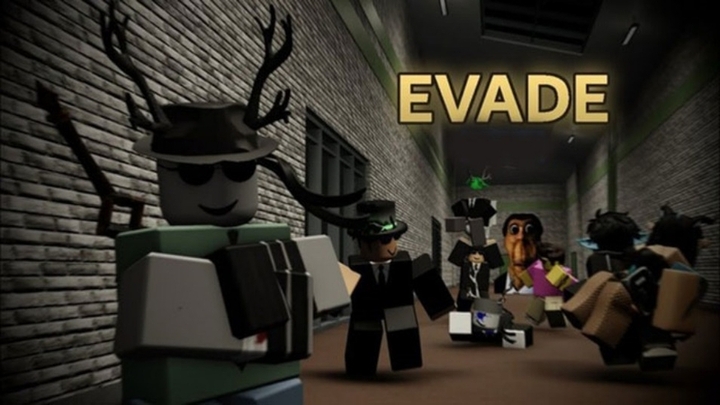
Few games on the Roblox platform deliver the sheer adrenaline and chaotic comedy of Evade. Inspired by the classic Garry's Mod Nextbot survival game mode, Evade pits players against relentless, PNG-rendered Nextbots that pursue targets with absolute pathfinding precision and terrifying speed. Surmounting these loud, fast-moving PNGs requires far more than basic WASD navigation. Success in Evade depends on mastering momentum physics, utilizing utility equipment, communicating under pressure, and understanding complex map geometry.
If you frequently find yourself downed within the first thirty seconds of a round, you are likely relying on standard walk speeds and linear movement. Moving from a novice victim to a high-tier survivor who can loop Nextbots indefinitely requires a complete mechanical re-evaluation. This comprehensive step-by-step guide walks you through every phase of your Evade career, providing actionable strategies to help you master momentum movement, optimize utility loadouts, navigate extreme map hazards, and carry your team to victory across every game mode.

1. How to Master the Core Movement Mechanics: Strafe-Jumping, Sliding, and Air Strafe
The single most important skill in Evade is momentum preservation. Nextbots move at a constant speed that is faster than a player's base sprint. Therefore, running in a straight line will always result in you getting caught and eliminated. To outpace Nextbots, you must learn to chain movement inputs—specifically Slide-Jumping and Air-Strafing—to generate and maintain a movement speed that exceeds default caps.
To execute a slide-jump chain, initiate a sprint, press your crouch key to slide, and immediately jump at the start of the slide animation. As your avatar launches into the air, holding a directional strafe key (A or D) while smoothly turning your camera in the same direction executes an air-strafe. This maneuver curves your trajectory around corners without losing kinetic velocity, allowing you to build up immense speed through consecutive hops.
Essential Movement Principles
- Never Backpedal: Turning around to watch a chasing Nextbot reduces your speed and blinds you to forward obstacles.
- Camera Curve Alignment: Always sync your keyboard strafe inputs with smooth, fluid camera sweeps to maintain continuous air acceleration.
- Corner Sweeping: Slide-jump past sharp corridors early to avoid colliding with geometry walls and losing accumulated speed.
2. How to Configure Settings and Custom Keybinds for Maximum Precision
Before stepping onto a competitive map, optimizing your game settings is mandatory. By default, Roblox settings introduce visual clutter, motion blur, and restricted fields of view that impede spatial awareness. Access your in-game settings menu and make critical adjustments to maximize frame rates and visual clarity.
First, set your Field of View (FOV) to its maximum value (typically 100 to 120 degrees). A wider FOV dramatically expands your peripheral vision, allowing you to spot approaching Nextbots through side corridors without turning your camera away from your path. Additionally, disable Motion Blur and Camera Shake, as these visual effects distort distance estimation during high-speed movement chains.
Recommended Control and Visual Tweaks
- Rebind Crouch: Swap the crouch key from Left Control to Left Shift or C for faster, more comfortable sliding inputs.
- Enable Night Vision Toggle: Assign a dedicated, accessible keybind for Night Vision or Flashlights to react instantly on dark map variants.
- Audio Balancing: Turn off background music and increase master sound effects to hear Nextbot audio cues and spatial proximity through walls.
3. How to Select, Purchase, and Optimize Equipment and Utility Loadouts
As you complete rounds and survive matches, you earn Points and Tokens that can be spent in the Equipment Shop. Items are divided into primary categories: Usables (Sensors, Barriers, Speed Cola), Utilities (Lanterns, Night Vision, Radar), and Equipables (Stilts, Boots, Armor). Choosing complementary loadout combinations dictates your survivability in hard-difficulty rounds.
For solo players focusing on survival, equipping Speed Cola alongside Hermes Boots provides an unmatched speed baseline that makes slide-jump chaining far more forgiving. If your primary goal is supporting your team and farming cash rewards, equipping the Teleporter or Radar alongside Medical Holsters allows you to revive downed teammates safely from a distance.
4. How to Utilize Audio Cues and Spatial Proximity Tracking
Nextbots do not spawn silently; they broadcast loud audio tracks, popular meme audio clips, and localized sound effects that increase in volume as they draw near. Learning to calculate distance and direction purely through spatial audio cues allows you to predict Nextbot movements through solid walls long before they enter your line of sight.
When you hear a Nextbot's audio track rapidly increasing in volume and panning to your left ear, avoid running forward into the intersection. Instead, perform an immediate 90-degree slide-jump pivot away from that corridor segment. Combined with the on-screen proximity red vignette, spatial audio provides all the information needed to loop enemies without visual contact.
Proximity Audio Management Checklist
- Headphones Required: Always play with stereo or spatial audio enabled to identify whether audio is panning left or right.
- Identify Unique Audio: Memorize the specific sound loops of high-speed Nextbots to anticipate their aggression patterns.
- Sound-Dampening Awareness: Be aware that certain special round modifiers reduce or muffle audio cues entirely.
5. How to Route Maps and Identify High-Ground Anchor Zones
Not all map real estate is created equal. Maps like Desert Bus, Complex, and Construction feature complex layouts containing both dangerous dead-end corridors and high-velocity open loops. Surviving consistently requires identifying "Anchor Zones"—elevated structures, ramp loops, and open plazas where you can run continuous laps without getting trapped.
Avoid staying inside narrow interiors or tight rooms with only a single entry point. If a Nextbot targets you while inside a single-door room, escaping without taking damage is virtually impossible. Always path toward open outdoor sections or structures featuring multiple drops, ramps, and vaultable railings that break Nextbot pathfinding routes.
"A narrow corridor is a coffin waiting to be closed; true survivors live on open ramps, elevated ledges, and multi-tiered loops."
6. How to Execute Safe Teammate Revives Under Heavy Pressure
In Evade, reviving downed teammates is a primary source of experience points, points income, and overall team survival. However, attempting a revive recklessly often leads to double eliminations. Nextbots frequently hover near downed players or backtrack along the exact same path, striking unsuspecting rescuers.
Before attempting a revive, perform a rapid 360-degree sweep of the immediate area. If a Nextbot is actively pursuing you or heading toward the downed player, deploy a Barrier or drop a Sensor nearby to distract or block the enemy path. Alternatively, use a Teleporter to move the downed player or yourself to a safe location before initiating the revive timer.
Safe Revive Execution Steps
- Clear the Perimeter: Ensure no Nextbots are actively locked onto your position or patrolling within a 50-foot radius.
- Deploy Utility Cover: Place a physical Barrier between the downed player and the nearest Nextbot spawn corridor.
- Execute Carry and Move: Pick up the downed player and relocate them to an elevated ledge before starting the revive bar.

7. How to Adapt Tactics for Special Game Modes and Modifiers
Standard rounds are relatively straightforward, but Evade frequently introduces chaotic Special Rounds that alter core mechanics. Modes like Impoviser, Nextbot Apocalypse, Lights Out, Bigbots, and Randomized Speed force players to completely abandon standard playbooks.
In Lights Out or Fog modes, visual range drops to near zero, making Night Vision Goggles or Lanterns mandatory for survival. In Nextbot Apocalypse or Double Trouble, the sheer quantity of Nextbots invalidates static camping strategies, requiring players to maintain continuous movement loops around the outer perimeters of the map for the entire duration of the timer.
Special Mode Counter-Strategies
Game ModeCore ThreatRecommended StrategyLights Out / DarkComplete visual deprivationEquip Night Vision Goggles; rely strictly on spatial audio cuesImpoviserExplosive Nextbot collisionsMaintain maximum distance; avoid crowding around other playersNextbot ApocalypseOverwhelming Nextbot densityStick to high elevated ledges and run wide perimeter loopsRandomized SpeedUnpredictable Nextbot accelerationOver-calculate safety margins; never attempt tight corner loops
8. How to Counter Unique Nextbot Behaviors and Pathfinding AI
While most Nextbots share identical speed and tracking profiles, their pathfinding AI evaluates player positioning using direct line-of-sight vectors and dynamic NavMesh calculations. Understanding how Nextbot AI processes movement allows you to trick their tracking logic using sharp corner cuts and elevation changes.
When a Nextbot is locked onto you, jumping off an elevated ledge forces the AI to instantly calculate a long ground route down the stairs or ramps to reach your new position. By vaulting over railings, dropping down a floor, and immediately using stairs to regain high ground, you exploit the delay in the AI's NavMesh recalculation, buying valuable seconds to recover stamina and reset your movement chain.
9. How to Manage Stamina, Jump Fatigue, and Environmental Hazards
While movement speed is king in Evade, blindly spamming the jump input leads to Jump Fatigue—a hidden penalty that reduces your jump height and movement speed after several consecutive hops. Managing jump fatigue requires timing your jumps precisely at the end of each slide animation rather than mashing the jump key.
Additionally, many maps feature lethal environmental hazards, such as high fall-damage drops, toxic sludge pits, moving vehicles, and lava pools. Failing a slide-jump over a hazard pit results in instant death, regardless of how many health items or revive perks you hold. Always prioritize clean, safe pathing over risky shortcuts when navigating hazardous terrain.
Resource & Safety Checklist
- Avoid Jump Mashing: Space out your jumps so that each hop initiates cleanly from a slide to avoid triggering jump fatigue.
- Watch Fall Heights: Avoid dropping from extreme heights without equipping the Parachute or jumping onto slope angles that cancel fall damage.
- Clear Environmental Obstacles: Memorize hazard locations on maps like Construction and Complex to prevent accidental momentum deaths.
10. How to Farm Points, Level Up Fast, and Complete Mastery Milestones
Unlocking high-tier cosmetics, specialized badges, and elite utility gear requires millions of points and thousands of account experience points. While simply surviving rounds provides steady baseline rewards, optimizing your actions dramatically accelerates your leveling speed.
To maximize points per hour, combine survival play with high-volume teammate revives and item deployments. Playing on harder difficulty settings or populated public servers yields significantly higher reward multipliers. Always keep daily and weekly quest objectives active, as completing item usage and round survival goals provides massive flat point bonuses upon completion.
Conclusion: Becoming an Unstoppable Survivor
Mastering Roblox: Evade is a journey of converting chaotic panic into precise, high-speed movement and spatial control. The game transforms meme culture into an intense test of reflexes, spatial awareness, and resource management. Success does not come from hiding in dark corners, but from embracing movement, mastering slide-jump chains, leveraging utility equipment, and maintaining composure when three screaming Nextbots are chasing you down a narrow corridor.
As you drop into your next match, remember that every failed run and early elimination provides valuable data about map layouts, pathfinding quirks, and movement timing. Adjust your control settings, fine-tune your loadout, master the air-strafe, and step onto the pitch ready to outrun, out-maneuver, and outlast the chase.
Master movement physics, utility loadouts, spatial audio, and map routing to outrun Nextbots and dominate every match in Roblox: Evade.